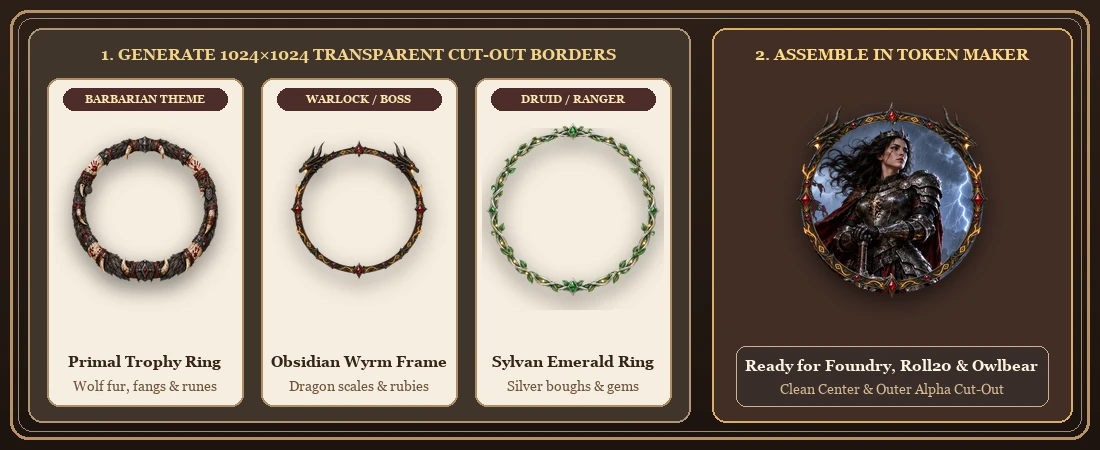
Every Dungeon Master knows the visual jarring that happens when a carefully painted battle map gets covered in mismatched character icons: a square screenshot here, a neon circle there, and three monsters sharing the exact same default gold ring. Using a dedicated DnD token border maker solves that problem at the root by letting you forge custom, transparent circular frames tailored to each character class, boss tier, or campaign faction.
Instead of locking a frame permanently onto a single portrait, the Fantasy Token Border Generator creates standalone 1024×1024 RGBA cut-out rings with a clean transparent center and outer alpha channel. You can design one signature frame for an entire faction—or craft a one-of-a-kind reliquary ring for a campaign villain—and assemble it with any portrait in seconds using the Token Maker.
Why separate the border from the portrait? When you generate a standalone transparent token border, you build a reusable asset. One custom silver-and-emerald ring can frame every member of an elven ranger enclave, keeping your Virtual Tabletop (VTT) encounter readable at a glance while saving hours of session prep.
What You’ll Learn in This Guide
- 🎨1Explore 3 real custom token border examples (Barbarian, Draconic Boss, and Sylvan Druid) with exact copy-paste prompts.
- 🛠️2Walk through the live Fantasy Token Border Generator worktable, reference image slots, and style controls.
- ⚡3Combine your transparent cut-out border with a character portrait in the Token Maker for Foundry VTT, Roll20, and Owlbear Rodeo.
- 🌌4Adapt your token frames beyond classic fantasy: grimdark, gothic thorns, cyberpunk, and sci-fi metallic rings.
- 🧭5Compare Token Border Generator vs. Circular Token Generator vs. Token Maker to pick the fastest workflow for tonight’s session.
1. Three Real DnD Token Border Examples (With Tested Prompts)
The fastest way to master a DnD token border maker is to think like a prop crafter. Rather than asking for a vague “cool magic circle,” specify four concrete ingredients in your prompt: base material, accent colors, symbolic trophies or gems, and a clean empty center opening.
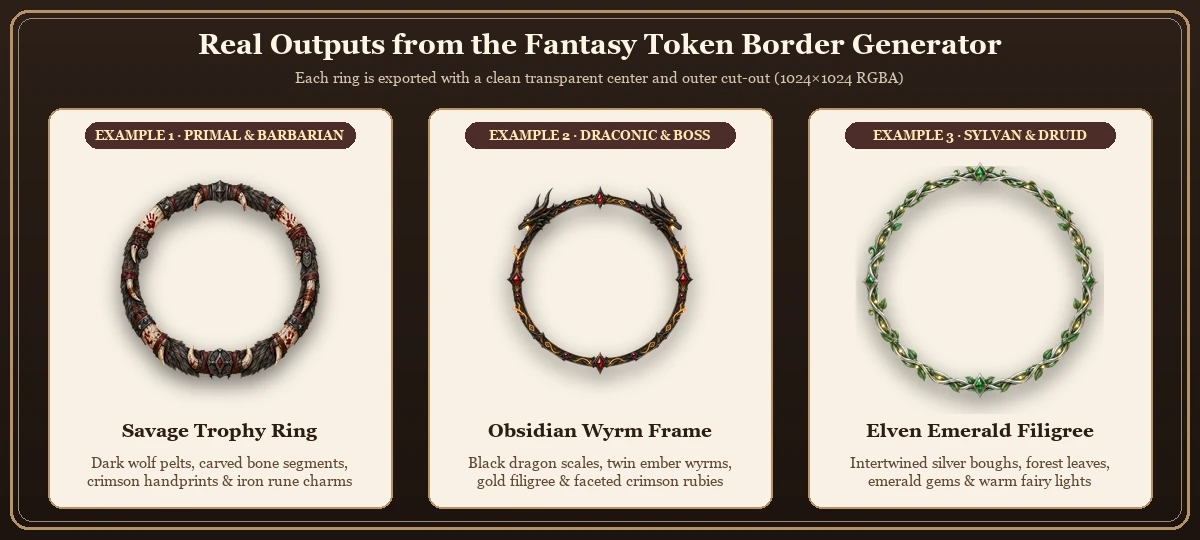
Below are three real 1024×1024 transparent borders generated directly inside the Fantasy Token Border Generator, along with the exact prompt formulas you can adapt for your own table.
Example A: The Primal Barbarian & Totem Warrior Ring
Standard gold or steel rings feel out of place on a rugged berserker, blood hunter, or gnoll warlord. By combining organic textures—wolf pelts, weathered bone, leather bindings, and iron rune charms—you get a brutal silhouette that reads immediately even when zoomed out on a large wilderness battle map.
Tested Prompt (Primal / Barbarian): Savage barbarian circular token border made of dark wolf fur pelts and carved bone segments bound with crimson leather straps, bloody handprints on the bone, weathered iron rivets, hanging Nordic rune talismans and beast fangs, symmetrical ring with a large clean empty center opening.
Example B: The Obsidian Wyrm & Ruby Boss Reliquary
When a major antagonist, dragon cultist, or high-level warlock enters initiative, their token frame should visually signal danger. Positioning twin sculpted dragon heads along the upper arc with four cardinal ruby gemstones gives the portrait an unmistakable “boss encounter” presence without covering the character’s face in the center.
Tested Prompt (Draconic / Boss Frame): Ornate dark fantasy circular token border forged from blackened dragon-scale metal and gold filigree, twin roaring obsidian wyrm heads at the top with glowing ember jaws, four faceted crimson diamond rubies set at the cardinal points, subtle flame tendrils, large clean center opening.
Example C: The Sylvan Silverwood & Emerald Filigree
For druids, fey wanderers, ancients paladins, and high-elf spellcasters, thinner intertwined silhouettes work best. Combining brushed silver branches with fresh leaves, faceted emeralds, and tiny warm fairy lights creates a delicate frame that complements nature-themed portraits.
Tested Prompt (Sylvan / Druid & Ranger): Elegant elven circular token ring crafted from intertwined silverwood branches and living green forest leaves, four marquise-cut emerald gemstones at the cardinal points, tiny warm glowing fairy dewdrops woven into the vines, large clean transparent center opening.
Color-coding combat encounters: Keep the same material prompt for an enemy squad, then swap only the gemstone or glow color in your prompt—such as ruby red for melee lieutenants, arcane violet for spellcasters, and emerald green for archers. Players can call targets instantly without squinting at numbered labels.
2. Inside the Live Fantasy Token Border Generator Worktable
The Fantasy Token Border Generator runs inside the Tavern’s Sacred Forge interface directly in your browser. Every control is laid out so you can move from a text idea to a cut-out PNG without wrestling with complex graphic editing layers.
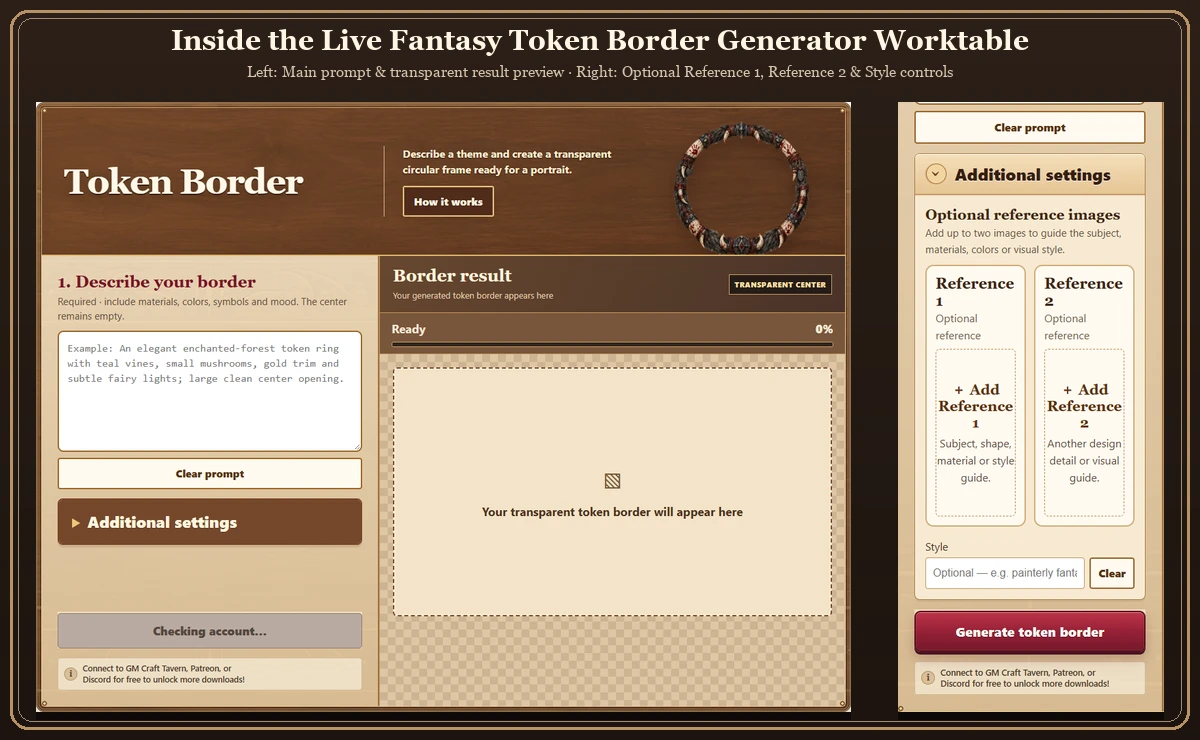
Here is how each section of the worktable functions in practice:
- 1. Describe your border (Required): Enter your materials, color palette, symbols, and mood. The generator is purpose-built for circular rings, so its backend pipeline automatically carves out both the exterior background and the inner portrait window using high-precision alpha extraction.
- Additional settings — Reference 1 & Reference 2 (Optional): Open the accordion to upload up to two reference images. You can drop in an existing piece of armor, a faction crest, or a previous token border so the new ring matches your campaign’s established metal finish or color scheme.
- Style (Optional): Guide the rendering finish—such as
painterly fantasy,dark weathered metal,hand-drawn ink and brass, orpolished ornate reliquary. - Border result & Transparent Center: Once generation finishes, your cut-out border appears on the right preview canvas. Free GM Craft Tavern accounts include 10 generation requests per day and 5 downloads per month, which you can expand to 10 monthly downloads by connecting either a free Patreon or Discord account—or 15 monthly downloads when both are connected.
Avoid overcrowding the center opening: Resist prompting for “crossed swords across the middle” or “chains spanning the center.” Anything that crosses the middle of the ring will obscure your character’s eyes once you place a portrait behind the frame. Keep spikes, wings, horns, and gemstones anchored along the outer rim.
Already have a portrait and want a square frame rather than a circular ring? This real square VTT token walkthrough shows how to crop a tall character image, choose a square library border and inspect the actual 1024 px PNG export. Continue below for the separate custom circular-border workflow.
3. From Cut-Out Frame to Table-Ready VTT Token in 30 Seconds
Generating your transparent ring is step one. Step two is combining that ring with a hero or monster portrait so it is ready to drop onto a battle map in Foundry VTT, Roll20, Fantasy Grounds, or Owlbear Rodeo.
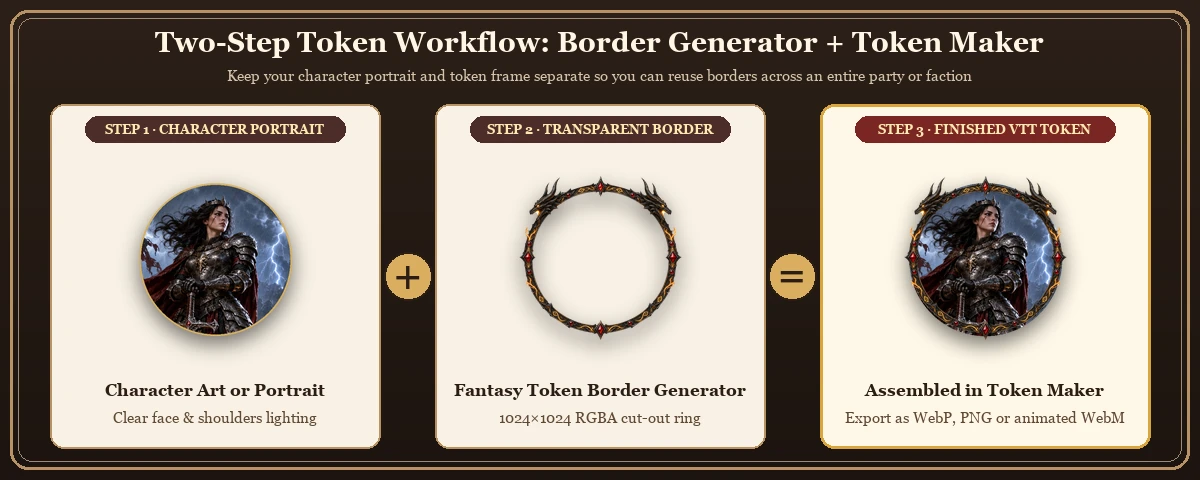
To assemble your finished token without opening desktop photo software:
- Prepare your character art: Use an existing illustration or create a new hero/NPC portrait in the DnD Character Art Generator. Half-body or head-and-shoulders portraits with clear facial lighting read best at tabletop zoom levels.
- Open the Token Maker: Head over to the browser-based Token Maker and upload your character portrait.
- Import your custom border: Load the transparent cut-out ring you downloaded from the Fantasy Token Border Generator. Pan and zoom the portrait until the character’s head sits cleanly inside the inner opening.
- Export for your VTT: Download your completed token. If you are building a large encounter pack and want to keep load times snappy for remote players, you can also optimize or batch-convert images using the Image Converter. For a deeper dive into file formats and animated WebM loops, check out our dedicated guide on how to create round VTT tokens for DnD and RPGs.
4. Beyond High Fantasy: Grimdark, Gothic, Cyberpunk & Sci-Fi Frames
Although most Dungeon Masters discover the tool while searching for a DnD token border maker, the underlying generator is not locked to medieval sword-and-sorcery. Because you control the material vocabulary and optional style prompt, you can forge rings for any tabletop system:
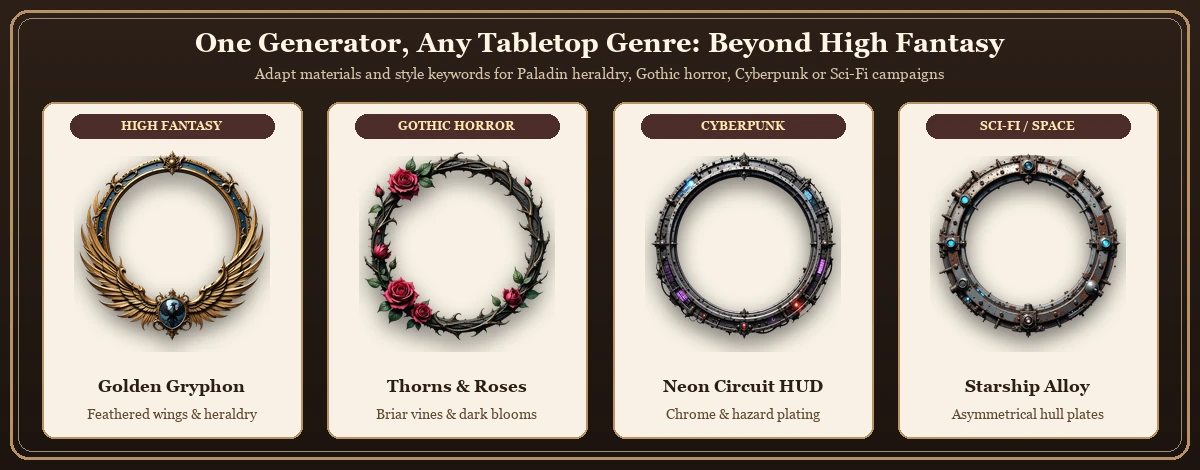
- High Fantasy & Paladin Heraldry: Prompt for
burnished gold gryphon wings, royal crest relief, and feathered bevelsto distinguish noble knights, clerics, or celestial allies. - Gothic Horror & Dark Domains: Prompt for
intertwining black briar thorns, withered crimson roses, and tarnished silver—ideal for vampire lords, cursed estates, and Ravenloft-style adventures. - Cyberpunk & Netrunner: Prompt for
matte carbon fiber ring, glowing cyan HUD circuitry, hazard stripes, and brushed chrometo frame street samurai, hackers, and corporate security drones. - Sci-Fi & Space Opera: Prompt for
asymmetrical starship hull armor plates, weathered titanium rivets, and amber cockpit indicator lightsfor spacefaring crews and mech pilots.
If you run multi-campaign folders across different genres, keeping a structured naming convention for your borders and portraits will save you from pre-session chaos—see our token and asset management workflow for online play for folder templates that scale cleanly.
5. Which GM Craft Tavern Token Tool Should You Use?
The Tavern offers several specialized tools inside the Free GM Tools hub. Depending on whether you need a reusable border, a single finished token, or an overhead miniature, here is how to pick the right worktable:
| Tavern Tool & Output | Best Use Case at the Table |
|---|---|
| Fantasy Token Border Generator 1024×1024 RGBA cut-out ring (empty center) | Creating reusable class, boss, or faction borders to wrap around existing portraits. |
| Token Maker Assembled static (PNG/WebP) or animated (WebM) token | Combining your portrait with a custom border, scaling, and exporting for VTT play. |
| Circular Token Generator Portrait + frame generated in one pass | Fast one-shot NPCs or monsters when you want the character and ring created together. |
| Top-Down Token Generator Overhead miniature with transparent background | Tactical combat tables that prefer top-down miniatures over framed portrait rings. |
Design transparent circular frames for every class, faction, and boss in your campaign—then assemble your VTT tokens in seconds.
Describe materials, runes, gems, or trophies to generate a 1024×1024 transparent cut-out frame ready for any character portrait.
Upload your character portrait, import your custom border, adjust the crop, and export a crisp token for Foundry, Roll20, or Owlbear Rodeo.
Need a fresh hero or villain portrait to place inside your new frame? Generate custom RPG portraits with full style control.
Frequently Asked Questions: DnD Token Border Maker
Is the center of the generated token border really transparent?
Yes. The Fantasy Token Border Generator exports a true RGBA cut-out ring where both the outside background and the inner portrait opening are transparent, so you can layer it directly over any character image.
How do I put my character portrait inside the generated border?
Download your border, then open the free Token Maker. Upload your character portrait, import your custom border file, position the face inside the ring, and click export.
What resolution and format work best for Roll20, Foundry VTT, and Owlbear Rodeo?
The generator outputs high-resolution 1024×1024 transparent frames. For day-to-day VTT encounters, exporting your final assembled token as a 400×400 or 512×512 WebP or PNG keeps details sharp when players zoom in while maintaining fast map loading.
How many custom token borders can I generate for free?
With a free GM Craft Tavern account, you get 10 generation requests per day across the Sacred Forge tools and 5 monthly downloads. Connecting your free Patreon or Discord account in the perks panel adds +5 monthly downloads each (up to 15 downloads per month for free).